
Feature
Notice Generation & Delivery Tracking
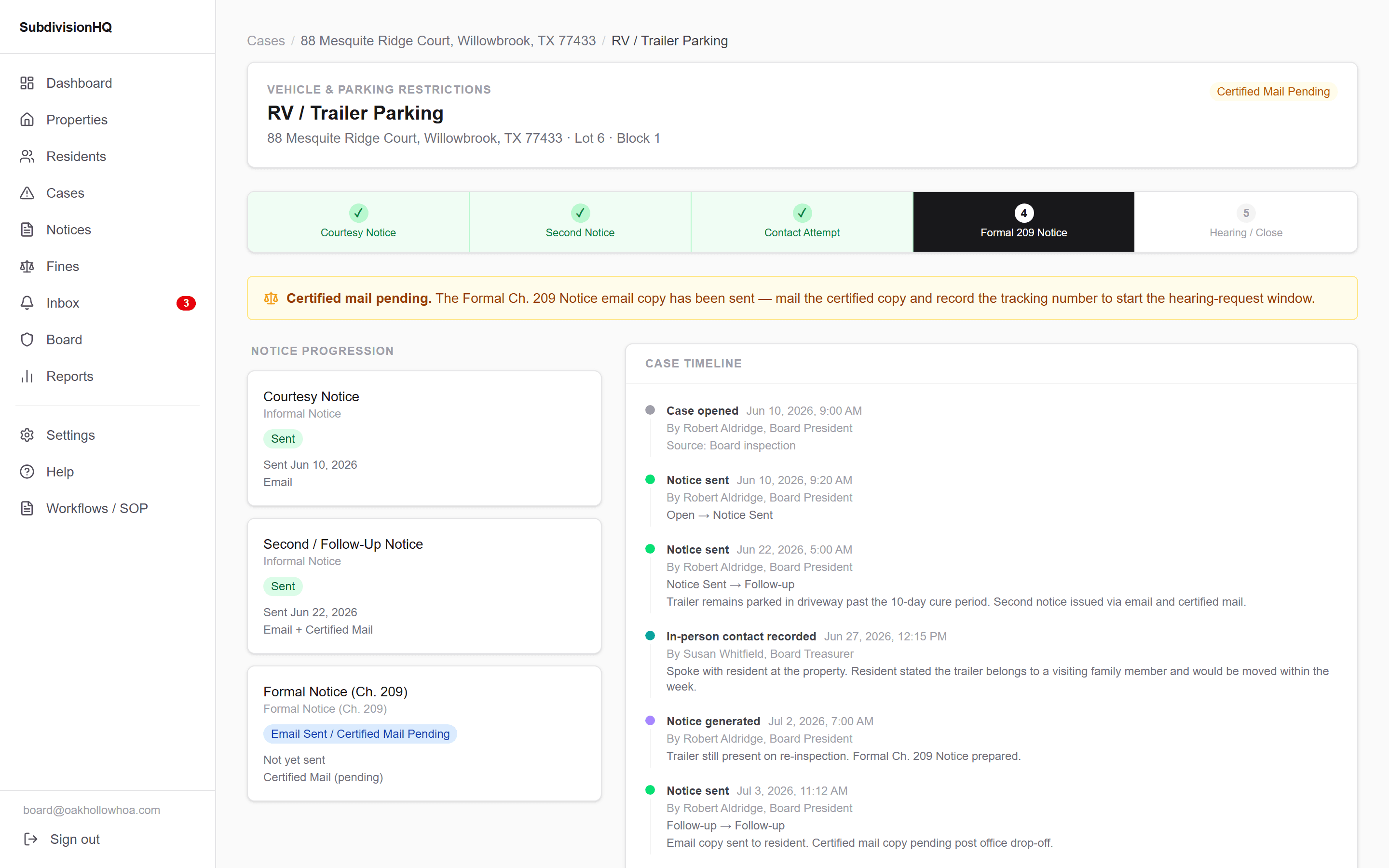
Courtesy notice, second notice, formal notice — each step generated, sent, and logged in order.
Notice delivery is hard to prove after the fact
When a case escalates, the board needs to show exactly what was sent, when, and how it was delivered. Relying on memory or a scattered paper trail months later is a weak position to be in.
Every notice is generated, sent, and recorded against the case
SubdivisionHQ generates each notice from the case's rule citations and history, then records the delivery method and date directly on the case timeline — building the record as you go, not after the fact.
How it works
- 1
Generate the notice
Notice content pulls the case's rule citations and history automatically.
- 2
Record delivery
Log delivery method — email, mail, certified mail — and the date sent.
- 3
Escalate on schedule
Courtesy, second, and formal notices follow your board's configured escalation steps.
- 4
Review notice history anytime
See every notice ever sent for a case or a property in one list.
Why it matters
- A complete, dated notice history for every case
- Consistent notice language and escalation steps across cases
- Delivery proof recorded at the time it happens, not reconstructed later
- Rule citations captured at send time, even if governing documents are later updated
Frequently Asked Questions
- Does SubdivisionHQ send certified mail for me?
- SubdivisionHQ tracks delivery method and dates for however your board sends notices, including certified mail handled outside the platform.
- What happens if governing document rules change after a notice is sent?
- Notices snapshot the rule citations in effect at send time, so historical notices stay accurate even after governing documents are updated.
Related Features
Related Solutions
Related Resources
Courtesy Notice vs. Final Notice: What's the Difference?
Not every violation notice carries the same weight. Understanding the escalation sequence keeps enforcement consistent from case to case.
Learn moreHow HOA Violation Notices Should Be Documented
A notice that isn't documented is a notice you can't prove you sent. Here's what a defensible record actually looks like.
Learn moreSee Notice Tracking in your own community
We'll walk through how it fits your board's current process.
Request a Demo